

Mascofast Review
First Impressions
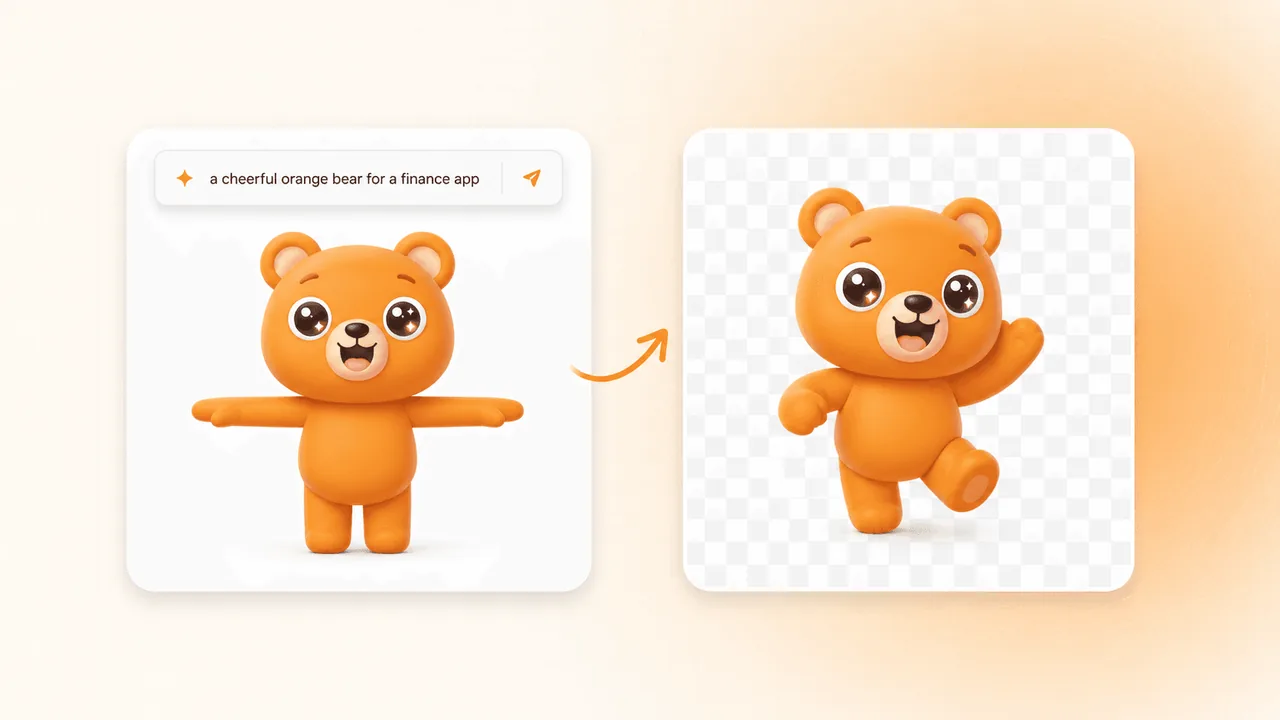
Mascofast is visually refreshing and easy on the eyes. The hero section color palette is fantastic, and the playful mascot animation immediately showcases what the solution offers right off the bat. From the moment you land on the page, the options are clear, making onboarding completely seamless.
I also noticed a very detailed walkthrough video on the page that explains everything you need to know to get started.
Taking it for a Spin
To test the platform, I entered a prompt:
"A cute, playful orange cat mascot with big expressive eyes, chibi style, clean vector lines, vibrant flat colors, solid white background, friendly expression, modern branding style."
I picked the Chibi style, logged in seamlessly, and clicked Generate Mascot. However, because you do not get any free credits upon signing up, I was unable to see what my cute orange cat would have looked like.
I also noticed the Brainstorm feature, which requires credits as well, though it looks like a great addition. I am curious if the inbuilt AI uses custom backend prompts directed specifically toward mascot design.
UX & Features
Billing information seems very straightforward. It does not seem to have any hidden costs, and everything is laid out clearly. The option to buy extra credits without committing to a full subscription plan is a great feature.
The settings menu keeps things simple with a sign-out button and a clever "wait game" toggle that turns off animations while it renders (a great idea to keep someone engaged on the page instead of drifting off to a short video!).
The support page is clean and lets you reach out directly to request features or get help. The FAQ lists everything a user needs to know without overdoing it, while the terms and privacy policy are kept within arm's reach and explained clearly. Having a dedicated Styles page is also a neat touch to give users a clear idea of what can be created.
What Could Be Better
My biggest piece of feedback is the initial paywall experience. After clicking Generate Mascot, I was taken straight to a pricing screen. As a first-time user, it would be ideal to try the product for at least one test generation or receive enough preview credits, even if it does not animate yet. I completely understand there are server costs behind running AI API generations, but getting a taste of the tool first would make a big difference.
I did initially hit an issue with the checkout when trying to subscribe or buy credits across different browsers. However, after reaching out to the founder, they fixed the issue right away and even provided a discount code. It is great to see a developer who is so responsive and quick to resolve issues for their users.
The Verdict
Overall, from what I can tell, the solution is built very well. The page is responsive, the process is smooth, and the design is great. The mobile view is just like the desktop version, working on a smaller screen with absolutely no complaints.
The founder's quick response and fast fix on the payment issue shows there is strong support behind the product. I would still love to see a few free credits added for first-time users, but other than that, great job.
Mascofast Review
First Impressions
Mascofast is visually refreshing and easy on the eyes. The hero section color palette is fantastic, and the playful mascot animation immediately showcases what the solution offers right off the bat. From the moment you land on the page, the options are clear, making onboarding completely seamless.
I also noticed a very detailed walkthrough video on the page that explains everything you need to know to get started.
Taking it for a Spin
To test the platform, I entered a prompt:
"A cute, playful orange cat mascot with big expressive eyes, chibi style, clean vector lines, vibrant flat colors, solid white background, friendly expression, modern branding style."
I picked the Chibi style, logged in seamlessly, and clicked Generate Mascot. However, because you do not get any free credits upon signing up, I was unable to see what my cute orange cat would have looked like.
I also noticed the Brainstorm feature, which requires credits as well, though it looks like a great addition. I am curious if the inbuilt AI uses custom backend prompts directed specifically toward mascot design.
UX & Features
Billing information seems very straightforward. It does not seem to have any hidden costs, and everything is laid out clearly. The option to buy extra credits without committing to a full subscription plan is a great feature.
The settings menu keeps things simple with a sign-out button and a clever "wait game" toggle that turns off animations while it renders (a great idea to keep someone engaged on the page instead of drifting off to a short video!).
The support page is clean and lets you reach out directly to request features or get help. The FAQ lists everything a user needs to know without overdoing it, while the terms and privacy policy are kept within arm's reach and explained clearly. Having a dedicated Styles page is also a neat touch to give users a clear idea of what can be created.
What Could Be Better
My biggest piece of feedback is the initial paywall experience. After clicking Generate Mascot, I was taken straight to a pricing screen. As a first-time user, it would be ideal to try the product for at least one test generation or receive enough preview credits, even if it does not animate yet. I completely understand there are server costs behind running AI API generations, but getting a taste of the tool first would make a big difference.
I did initially hit an issue with the checkout when trying to subscribe or buy credits across different browsers. However, after reaching out to the founder, they fixed the issue right away and even provided a discount code. It is great to see a developer who is so responsive and quick to resolve issues for their users.
The Verdict
Overall, from what I can tell, the solution is built very well. The page is responsive, the process is smooth, and the design is great. The mobile view is just like the desktop version, working on a smaller screen with absolutely no complaints.
The founder's quick response and fast fix on the payment issue shows there is strong support behind the product. I would still love to see a few free credits added for first-time users, but other than that, great job.
Mascofast Review
First Impressions
Mascofast is visually refreshing and easy on the eyes. The hero section color palette is fantastic, and the playful mascot animation immediately showcases what the solution offers right off the bat. From the moment you land on the page, the options are clear, making onboarding completely seamless.
I also noticed a very detailed walkthrough video on the page that explains everything you need to know to get started.
Taking it for a Spin
To test the platform, I entered a prompt:
"A cute, playful orange cat mascot with big expressive eyes, chibi style, clean vector lines, vibrant flat colors, solid white background, friendly expression, modern branding style."
I picked the Chibi style, logged in seamlessly, and clicked Generate Mascot. However, because you do not get any free credits upon signing up, I was unable to see what my cute orange cat would have looked like.
I also noticed the Brainstorm feature, which requires credits as well, though it looks like a great addition. I am curious if the inbuilt AI uses custom backend prompts directed specifically toward mascot design.
UX & Features
Billing information seems very straightforward. It does not seem to have any hidden costs, and everything is laid out clearly. The option to buy extra credits without committing to a full subscription plan is a great feature.
The settings menu keeps things simple with a sign-out button and a clever "wait game" toggle that turns off animations while it renders (a great idea to keep someone engaged on the page instead of drifting off to a short video!).
The support page is clean and lets you reach out directly to request features or get help. The FAQ lists everything a user needs to know without overdoing it, while the terms and privacy policy are kept within arm's reach and explained clearly. Having a dedicated Styles page is also a neat touch to give users a clear idea of what can be created.
What Could Be Better
My biggest piece of feedback is the initial paywall experience. After clicking Generate Mascot, I was taken straight to a pricing screen. As a first-time user, it would be ideal to try the product for at least one test generation or receive enough preview credits, even if it does not animate yet. I completely understand there are server costs behind running AI API generations, but getting a taste of the tool first would make a big difference.
I did initially hit an issue with the checkout when trying to subscribe or buy credits across different browsers. However, after reaching out to the founder, they fixed the issue right away and even provided a discount code. It is great to see a developer who is so responsive and quick to resolve issues for their users.
The Verdict
Overall, from what I can tell, the solution is built very well. The page is responsive, the process is smooth, and the design is great. The mobile view is just like the desktop version, working on a smaller screen with absolutely no complaints.
The founder's quick response and fast fix on the payment issue shows there is strong support behind the product. I would still love to see a few free credits added for first-time users, but other than that, great job.
FEATURED ON PITCHAIDE
Explore the SaaS or Workflow Request behind this story.
View listing →
← Back to all stories